Are phone decibel meter apps accurate?
Short answer: within about 3 dB in the middle of the range, if the app reads the microphone the right way and you calibrate it once. Outside that range, or with the wrong microphone setting, the number can be far off: apps that never read below 30 dB in a quiet room, or never above 88 dB at a concert, are common complaints. Here is what Android promises, what it only recommends, and how to check your own phone in a minute.
By Springlab · 21 October 2026. We make Sound Meter. Before we wrote the accuracy line it shows under every reading, we read Android's compatibility rules for microphones and 5,459 low-star reviews of the five biggest sound meter apps. This page is what we found. It is the sound version of How accurate is a phone level?
What Android promises, and what it only recommends
An app does not read "the microphone". It picks a source, and Android's rules (the Compatibility Definition, sections 5.4.2 and 5.11) say what each source must or should do. The difference between MUST and SHOULD is the whole story.
| Source | Rule | Strength |
|---|---|---|
| Voice recognition | Noise reduction and automatic gain control off by default | MUST |
| Flat within ±3 dB from 100 Hz to 4 kHz | SHOULD | |
| A 90 dB tone gives −22.35 dBFS, ±3 dB | SHOULD | |
| Level tracks the sound over at least 30 dB (72 to 102 dB) | SHOULD | |
| Unprocessed | A 94 dB tone gives −36 dBFS; no gain control, no high-pass filter | MUST, if the phone offers this source |
| Flat within ±10 dB from 100 Hz to 7 kHz | MUST, if offered | |
| Self-noise at most 34 dB(A) | MUST, if offered | |
| Default ("MIC") | No level rule at all; gain control and noise suppression allowed | – |
So the best case is a phone that offers the unprocessed source: its level is fixed by a MUST, and the app can turn dBFS into dB SPL with one number. The common case is voice recognition, where the ±3 dB is only a recommendation. And an app that reads the default source has no promise at all: the phone may turn the gain up in a quiet room and down in a loud one, which is exactly the behaviour people complain about.
None of this covers below 100 Hz (bass, traffic rumble) or above 4 to 7 kHz. Phone microphones are weak at low frequencies, and the rules say nothing about them.
The four ways apps go wrong
From 5,459 one-to-three-star reviews of the five biggest sound meter apps on Google Play (US, October 2026). Ads were the top complaint at 19.3 %; these are the accuracy ones.
| Complaint | Share of reviews | Likely cause |
|---|---|---|
| Disagrees with a real meter, or two phones differ | 8.3 % | No calibration, or a source with gain control |
| Calibration missing, or needs a huge offset (+22 dB) | 4.2 % | The app guessed the phone's sensitivity |
| Never below 30 to 38 dB in a quiet room, jumpy | 3.5 % | The microphone's own noise floor, shown as if it were sound |
| Caps at 85 to 88 dB in loud places | 3.4 % | Automatic gain control, or clipping shown as a number |
The last two are not really errors of the microphone. They are errors of honesty: the app shows a number where it should say "quieter than I can hear" or "louder than I can measure".
A 1-minute check of your own app
- Quiet room, phone on a table, nobody talking. If the number never drops below about 35 dB, you are looking at the microphone's noise floor, not the room. The app should say so.
- Clap once, close to the phone. Watch the peak. If the number stops at the same value every time, around 85 to 88 dB, the source is clipping or the gain is being turned down.
- Compare two phones, or your app and the decibel meter in your browser, side by side, microphones together. More than 3 dB apart at normal talk level means at least one of them is off.
- If you can borrow a real meter, hold the phone next to it at a steady sound and set the app's offset until they agree. If the app has no offset setting, that is your answer.
Hold the phone the same way each time, microphone towards the sound, and keep fingers and cases away from the microphone hole. Anything over the hole lowers the reading.
What we do about it in Sound Meter
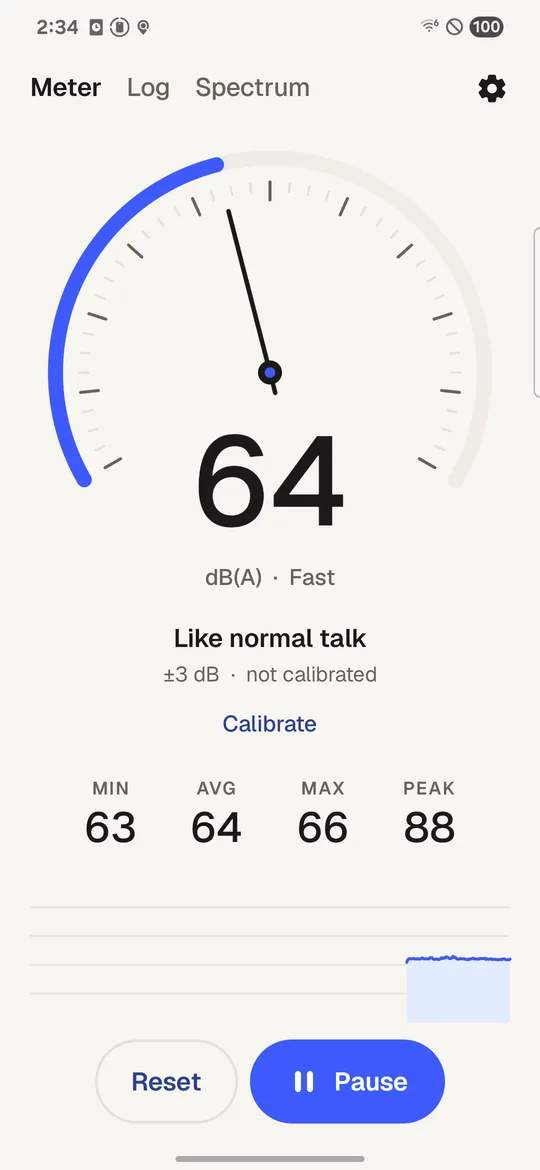
- It reads the unprocessed source where the phone offers it, and voice recognition where not. Never the default source.
- Every reading says how far to trust it: "±3 dB · not calibrated" until you calibrate, taken straight from the rule above. Whole numbers only: a decimal would claim more than a phone can give.
- In a quiet room it says "≤ 40" instead of showing the noise floor as a reading. When the samples clip it says "≥" with the number, because the real level is at least that much.
- Calibration is one offset, set next to a meter you trust, and the app warns you when the offset is more than 10 dB: that usually means the reference was wrong.
- The A-weighting filter is checked in our tests against the IEC 61672 class 2 tolerances from 31.5 Hz to 8 kHz. That is a test of the maths, not a claim that the phone is a class 2 meter. It is not.
What we have not done yet: measured a set of phones against a reference meter. Until then, the accuracy line stays at ±3 dB and the app stays a guide, not a certified instrument.
Questions
Can a phone replace a sound level meter?
For a guide, yes: is this room loud, is the machine louder than yesterday, which seat is quieter. For anything legal, at work or for a complaint, no. Those need a certified sound level meter, checked with a calibrator before the measurement.
Why do two phones show different numbers?
Different microphones, different cases, and different apps reading different sources. Android only recommends the sensitivity for the voice recognition source, so two phones that both follow the rules can still be 6 dB apart before calibration.
Is ±3 dB good enough?
For comparing one place or moment with another on the same phone, yes: the error is the same both times, so the difference between the two readings holds. For a number you want to quote to someone else, calibrate first or use a real meter.
Does a phone case matter?
Yes, if it covers or narrows the microphone hole. Take the case off, or make sure the hole is clear, when you measure.
Does the browser tool count as an app?
It uses the same maths, but a browser does not let the page choose the microphone source and may add its own processing. Treat it as a rougher guide than the app, and calibrate it the same way.