How accurate is a phone compass, and why is mine wrong?
Short answer: about ±3° at best, in the open and away from metal. That is our target from the sensor rules, not yet a measurement. Next to a magnet, a car or the steel in a desk, a phone compass can be off by tens of degrees, and a figure 8 does not fix that. Most of the “wrong direction” reports we read look like interference, not a broken phone.
By Springlab · 22 October 2026. We make Level & Compass. Before we let its compass show a “±” under the heading, we read Android's sensor rules, the magnetometer datasheet and 4,961 low-star reviews of the five most-installed compass apps. This page is what we found, and a two-minute test you can do with the online compass on this site.
How wrong it gets
We read 4,961 one- and two-star reviews of the five most-installed compass apps on Google Play (US, October 2026, the newest 800 per star for each app). The complaints are not about missing features:
| Complaint | Share of low reviews |
|---|---|
| Wrong direction, off by N° | 17.7 % |
| Figure-8 calibration does not help, or is lost again | 5.0 % |
| Spins or jumps | 2.2 % |
| A case, magnet or metal nearby | 2.1 % |
| True north wrong | 1.1 % |
Counts are keyword matches; we read samples of each theme to check them. The most up-voted review in the “wrong direction” group says it all: “60 degrees off to Northwest. Tried calibration procedure - figure 8 motion. Still does not indicate true North.” The reviewer blames the app. The cause is almost always the first thing in the next section.
What the sensor is up against
A phone compass reads a magnetometer, a chip that measures the magnetic field in three directions. The Earth's field is weak: about 22 to 67 microtesla (µT), and only part of that is horizontal, which is the part a compass uses. The numbers below come from Android's compatibility rules (the CDD, section 7.3.2), the datasheet of one magnetometer used in phones (the MEMSIC MMC5603), and our own error budget, the same sources as our level accuracy page.
| Source of error | Size | As heading error |
|---|---|---|
| The phone's own offset from the factory, before Android learns it (CDD: must be under 700 µT) | up to 700 µT | any direction: more than ten times the Earth's field |
| What is left after Android's in-use calibration (our estimate) | about 1 µT | about 2.6° at a 22 µT horizontal field |
| Noise, per sample, allowed by the CDD | up to 1.5 µT | about 4° |
| Noise of the MMC5603 (datasheet) | 0.2 µT | about 0.6° |
| Holding the phone 1° off flat, where the field dips at 61° | 1° | about 1.8° |
| A magnet, a laptop, a car, steel in a desk | no limit | no limit |
The first row is the big one. Android allows the sensor a built-in offset of up to 700 µT, more than ten times the field it is trying to measure. The phone must learn that offset while you use it, and keep it between reboots. That learning is what a figure 8 speeds up. Add the rows that are left after learning, and a good phone in the open lands at about ±3°. That is the number we show in the app, and it is a target until our phone tests are done.
Why the figure 8 helps, and when it cannot
To learn its own offset, the phone needs to see the Earth's field from many directions. A figure 8 does that in a few seconds. The phone then subtracts its offset from every reading. Android keeps the result, so you do not need to do it every day.
The figure 8 can only remove what moves with the phone. It cannot remove a field from outside:
- A car. The body is steel and the dashboard has speakers and motors. In a car, a phone compass is a guess.
- A desk or a table with a steel frame, a laptop on it, or a monitor.
- A magnetic case or car mount. This one moves with the phone, so the phone can learn part of it. A strong magnet pushes the sensor past what Android can correct, or past its range (the CDD: ±900 µT per axis), and then no calibration helps.
- Steel in a wall or a floor, a fridge, a filing cabinet, a bike.
If a figure 8 does not fix your compass, do not do more figure 8s. Walk ten steps away from everything metal and look again.
Magnetic north or true north?
A magnetometer points to magnetic north. Maps use true north. The difference, the declination, depends on where you are: near 0° in parts of the central US and Europe, more than 15° in parts of Canada, Alaska and New Zealand. One reviewer in our set lives where it is 25°, and the app's “true north” switch changed nothing. An app that offers true north needs your rough location and a model of the Earth's field.
Android has that model built in. It is the 2020 World Magnetic Model, which expired at the end of 2024. We checked it against NOAA's current model for four cities: the largest difference was 0.15°, in London, inside NOAA's own stated uncertainty of about ±0.4°. So the expired model is fine, and we test it in our build every time.
Test your phone in two minutes
- Open the online compass on your phone, outside, ten steps from any car or building.
- Hold the phone flat at waist height and point it along a straight street. Read the heading.
- Open a map, north up, and read the street's direction. A difference of a few degrees is normal. Twenty degrees or more means the phone needs a figure 8, or something near you is magnetic.
- Now bring a key ring, a magnetic case or a laptop within a few centimetres of the phone. Watch the heading swing. Move it away: the heading should come back within a second or two. That swing is what happens on a desk or in a car, without warning.
- If the compass sits 20° off everywhere, even outside, do a figure 8 once and read again.
The browser cannot tell the page how good the reading is, so the online compass shows a possible-error wedge only when the browser reports one (Safari does). The app can do more, below.
What we show in the app
The compass in Level & Compass shows a “±” under every heading, and a warning instead of a number when the reading cannot be trusted:
| State | What the app shows | Why |
|---|---|---|
| Android reports high sensor accuracy, field looks like the Earth's | ±3°, or the phone's own estimate if it is larger | The error rows above, after calibration |
| Android reports medium or low accuracy | ±10° or ±20° | The offset is not learned yet; do a figure 8 |
| The field does not look like the Earth's | “Magnet or metal nearby”, no number | Something outside the phone is bending the reading |
The last row is the one we built the compass around. The app compares the field it measures with the Earth's: outside 20 to 70 µT it warns, and with true north on (Pro) it also compares the strength and the dip angle with the model for your area, and warns past 15 % or 6°. It waits half a second before warning and a second and a half before clearing, so a passing car does not make it flicker. These are design targets from the datasheets and the CDD; we are now testing them on phones against a known bearing, and will put the results on this page.
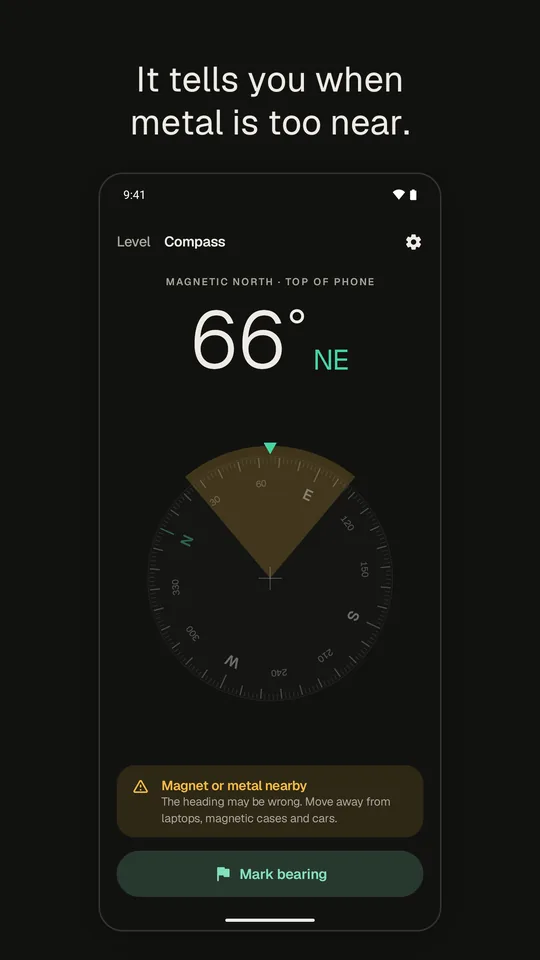
The app is on Google Play. The compass and the bubble level are free; Pro, one payment, adds true north.
Questions
How accurate is a phone compass?
About ±3° at best, in the open and away from metal. That is a target we set from Android's sensor rules and the sensor datasheets; we are now measuring it on phones. Indoors, in a car or next to steel it can be off by tens of degrees.
Why is my phone compass wrong by 20° or more?
Almost always something magnetic near the phone: a magnetic case or car mount, a laptop, a car body, steel in a desk or a wall. The Earth's field is weak, 22 to 67 microtesla, so a small magnet is stronger. Move away and the reading recovers.
Does the figure 8 calibration work?
It teaches the phone its own magnetic offset, the part that moves with the phone, and Android keeps that between reboots. It cannot remove a field from outside the phone. If the error stays after a figure 8, look for a magnet or metal near you, not for a better figure 8.
Does my phone compass show true north or magnetic north?
Magnetic north, unless the app corrects it with your location. The difference is the declination: near 0° in parts of the central US and Europe, more than 15° in parts of Canada, Alaska and New Zealand. Android's model for it was within 0.15° of NOAA's in our check of four cities.
Why does my phone have no compass?
Some cheap phones have no magnetometer. Android only recommends one; it does not require it. No app can give a heading on such a phone. Level & Compass says so on the Compass tab instead of showing a dial.